LimeLight
What is Limelight?
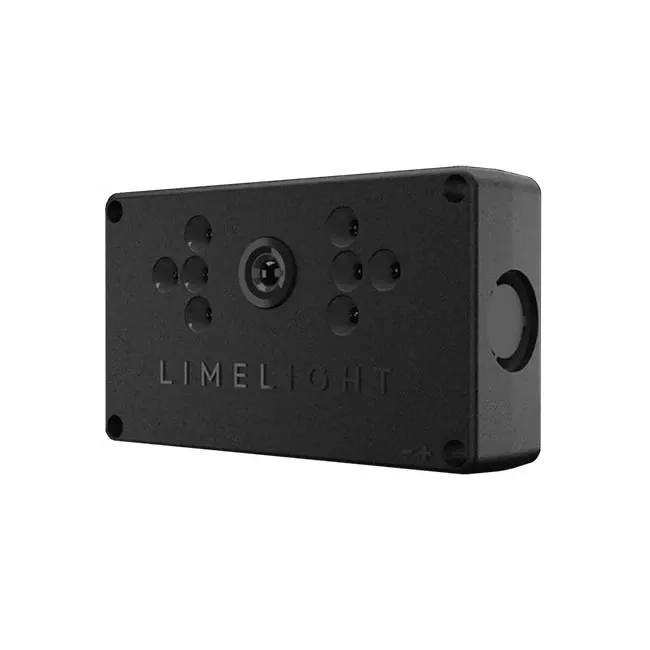
Limelight is a plug-and-play smart camera purpose-built for the FIRST Robotics Competition. It is also one of the most effective and easy to use cameras with arguably the simplest and easy to use user interface.
Setup
To initially setup the networking on Limelight, you first need to connect to your robots network on a Windows device. Next, go to http://limelight.local:5801, click “Settings”, enter your team number, update the number, and then set your Limelight’s IP address to “10.TE.AM.11”. Then set the Netmask to “255.255.255.0” and the Gateway to “10.TE.AM.1”. Power-cycle your robot. Now you will be able to access your config panel at http://10.TE.AM.11:5801, and your camera stream at http://10.TE.AM.11:5800.
A Limelight device communicates its values over NetworkTables, a system that is already setup with a WPILib robot code base. Furthermore, the tables that WPILib uses are using a Hashmap, meaning that there are values and keys for all of the data being sent, (you will see why this is important later). The values being sent are “tv”(whether or not limelight sees any targets), “tx”(horizontal offset from the reflective target), “ty”(vertical offset from the target), and “ta”(the target area).
Programming
If you are writing your robot code in java, you first need to have the following imports:
import edu.wpi.first.wpilibj.smartdashboard.SmartDashboard;
import edu.wpi.first.networktables.NetworkTable;
import edu.wpi.first.networktables.NetworkTableEntry;
import edu.wpi.first.networktables.NetworkTableInstance;
Next, you need to initialize the variables to hold your tv, tx, ty, and ta from NetworkTables. Here at Texas Torque, we have a singleton method that updates periodically every second so we put our tx, ty, and ta inside of our update method to get accurate and almost real time values.
NetworkTable table = NetworkTableInstance.getDefault().getTable("limelight");
NetworkTableEntry tx = table.getEntry("tx");
NetworkTableEntry ty = table.getEntry("ty");
NetworkTableEntry ta = table.getEntry("ta");

public void update() {
NetworkTable table = NetworkTable.getTable("limelight");
double targetOffsetAngle_Horizontal = table.getNumber("tx", 0);
double targetOffsetAngle_Vertical = table.getNumber("ty", 0);
double targetArea = table.getNumber("ta", 0);
double targetSkew = table.getNumber("ts", 0);
}
If you would like to change the leds on Limelight (on, off, blink), you can set them with another table. The last integer will change with 0 setting the LED Mode set in the current pipeline, 1 to force off, 2 to forcce blink, and 3 to force on.
NetworkTableInstance.getDefault().getTable("limelight").getEntry("ledMode").forceSetNumber(3);Finding Targets
To have Limelight lock onto a target, you need to aim a robot with a Limelight camera to a reflective tape strip. These are usually found on goals in FRC matches. After that, connect to the robots wifi network and go to http://10.TE.AM.11:5801. From here, ensure that you have a live feed from the Limelight. You should see the reflective tape strips on the feed glowing a bit. To tune the camera, go to the Thresholding tab and then click on the eyedropper. Now click on the pixels for the glowing vision strips and then you should see a red dot on the strip. You should also be able to see updating t-values underneath the stream. If you are getting interference with your stream, edit the sliders in the Thresholding tab until your t-values are consistent.
Measuring Distances
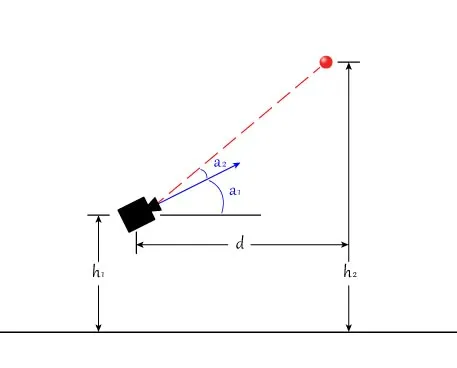
If you need to be able to calculate the distance between a target and your robot, there is a simple way to do this. The first thing that you will need is to get a few measurements. The height up to the middle of the Limelight lense from the ground(h1), the height of the vision tape strips(h2), the angle that the Limelight is mounted at(a1), the ty value from the Limelight, and for testing purposes, the horizontal distance from the vision strips to the Limelight camera(d). You can now plug these values into the equation d = (h2-h1) / tan(a1+a2). If the distance output you are getting is not accurate to the actual measured distance, try adjusting your a1 value by a few degrees.