Posture
While it might not seem important, having proper posture while working at a desk is crucial to preventing RSI. RSI (Repetitive Strain Injury) is the general term used to describe damage and pain caused by repetitive movement and overuse. RSI impacts muscles, nerves, ligaments, and tendons. Symptoms could include fatigue, Carpal Tunnel Syndrome or Osteoarthritis.
What is the difference between Carpal Tunnel and Arthritis?
Arthritis is a disease that involves inflammation or breakdown of your joints, leading to pain when bending or flexing the area. Some of the earliest signs of arthritis could be pain, swelling, warm joints, stiffness, numbness and tingling, and bumps in the fingers. On the other hand, Carpal tunnel syndrome is when a major nerve in the hand, the median nerve, becomes compressed in the carpal tunnel, a narrow passageway on the palm side of your wrist that also houses the tendons that bend the fingers. Repetitive hand motions, such as those that occur when someone works on an assembly line, often contribute to carpal tunnel syndrome. With excessive motion, the tendons of the fingers can get swollen or inflamed and squeeze the median nerve. Arthritis is inflammation or damage to a joint versus Carpal Tunnel squeezing a nerve, both resulting in difficulty in squeezing your hand. There is a common misconception that excessive typing leads to Carpal Tunnel, however typing is more likely to lead to arthritis than Carpal Tunnel.
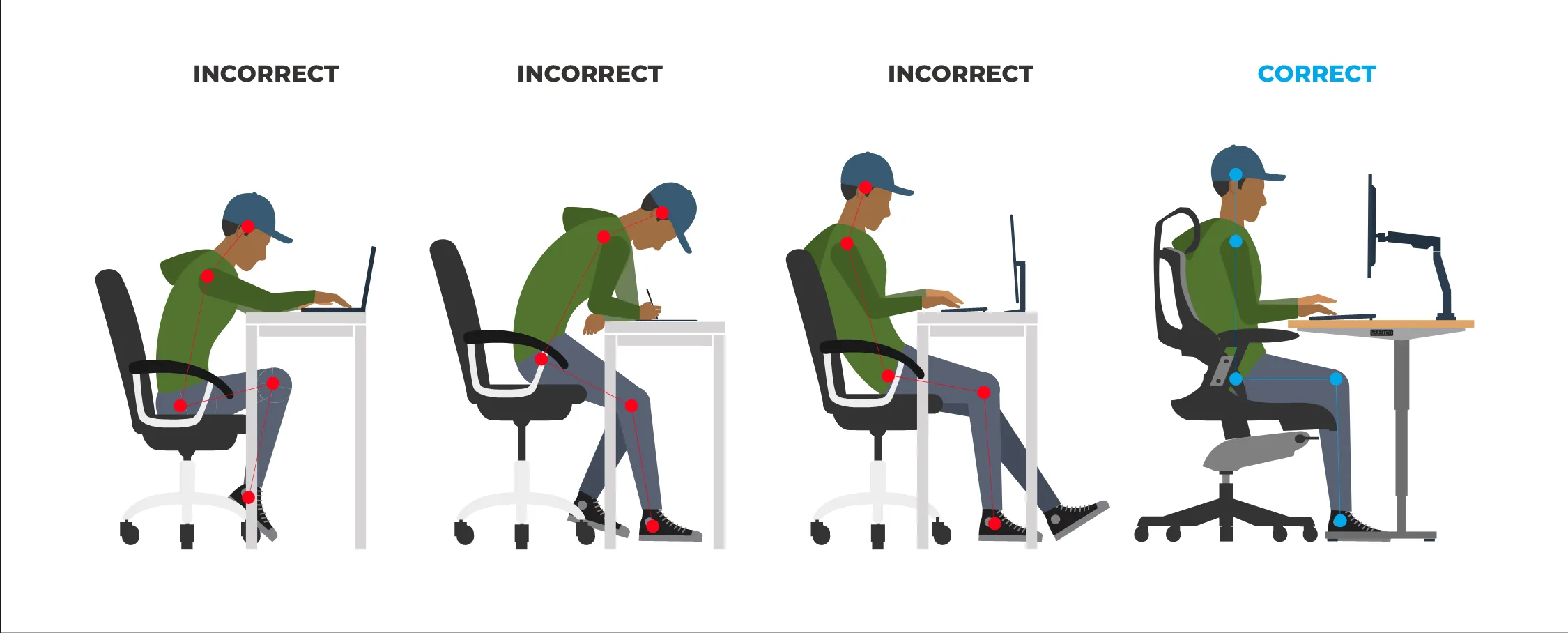
How To Properly Setup Your Desk
Spending hours and hours a day reaching, slouching, or even craning your body at a desk can lead to pain later in life. Some of the best ways to avoid this from happening are to set up your desk more ergonomically. Adjust your chair such that your elbows are bent at 90 degrees when they are rested on the desk. If this leads to your feet dangling, use a footstool or box so your feet can rest comfortably. Next, try to have your monitor at arms distance away from you. This prevents you from straining your eyes or bending forward and messing with your posture. Also, adjust the height of your monitor so that the top of it is at eye level. If you are using a laptop at a desk, it is recommended to prop the laptop up on a stand (such that the top of the screen is at eye level) and then use an external keyboard and mouse to prevent strain. Also, adjust the position of your keyboard so the natural position that your hands end up is where the keyboard is. For your mouse, place it right next to the keyboard and move the mouse side to side with your elbow rather than your shoulder.
Do Standing Desks Help?
While sitting at a desk, the average person burns around 80 calories/hour. While standing, the number of calories burned is only slightly higher than while sitting about 88 calories/hour. For reference, walking burns about 210 calories/hour. So while the new study suggests that a standing desk is unlikely to help with weight loss or avoiding weight gain, there may be other benefits of a standing desk. Advocates of standing desks point to studies showing that after a meal, blood sugar levels return to normal faster on days a person spends more time standing. And standing, rather than sitting, may reduce the risk of shoulder and back pain.
Keep in mind that using a standing desk is like any other “intervention” - it can come with side effects. For example, if you suddenly go from sitting all day to standing all day, you could run the risk of developing back, leg, or foot pain. It’s better to slowly adjust to it by starting with 30 to 60 minutes a day and gradually increasing it. Setting a timer to remind you when to stand or sit (as many experts recommend) can disrupt your concentration, reduce your focus, and reduce your efficiency or creativity. You may want to experiment with different time intervals to find the one that works best for you. It’s also true that certain tasks, especially those requiring fine motor skills, can be more accurately performed while seated. So, a standing desk may not be a good answer for everyone who sits a lot at work.